
%20--%3e%3csvg%20version='1.1'%20id='Capa_1'%20xmlns='http://www.w3.org/2000/svg'%20xmlns:xlink='http://www.w3.org/1999/xlink'%20x='0px'%20y='0px'%20viewBox='0%200%20512%20512'%20style='enable-background:new%200%200%20512%20512;'%20xml:space='preserve'%3e%3cpath%20style='fill:%23F2F2F2;'%20d='M512,256c0,36.76-7.753,71.711-21.703,103.309c-2.1,4.754-4.326,9.415-6.708,14.002v0.01%20c-3.218,6.249-6.698,12.34-10.418,18.275c-6.081,9.738-12.821,19.048-20.146,27.847c-5.13,6.196-10.564,12.142-16.259,17.826%20c-8.119,8.098-16.771,15.642-25.913,22.601c-17.136,13.03-35.965,23.96-56.101,32.381c-10.449,4.378-21.243,8.077-32.34,11.045%20h-0.01c-7.043,1.891-14.2,3.49-21.462,4.765C286.354,510.652,271.329,512,256,512c-1.567,0-3.135-0.01-4.702-0.052%20c-11.901-0.209-23.594-1.233-35.035-3.02c-16.426-2.55-32.34-6.677-47.574-12.204c-28.411-10.303-54.481-25.496-77.187-44.565%20c-27.606-23.176-50.249-52.067-66.1-84.846C9.122,333.657,0,295.894,0,256C0,114.615,114.615,0,256,0S512,114.615,512,256z'/%3e%3cg%3e%3cpath%20style='fill:%232D3A3E;'%20d='M445.388,424.657l-144.447,83.404c7.262-1.275,14.42-2.873,21.462-4.765h0.01%20c11.097-2.967,21.891-6.666,32.34-11.045l56.101-32.381c9.143-6.959,17.795-14.503,25.913-22.601%20c5.695-5.684,11.128-11.63,16.259-17.826C450.623,421.366,448.073,423.1,445.388,424.657z%20M452.002,123.476L296.155,33.499%20c-23.625-13.636-52.976-13.636-76.601,0L63.707,123.476c-23.625,13.636-38.306,39.058-38.306,66.341v177.497%20c15.851,32.778,38.494,61.67,66.1,84.846l77.187,44.565c15.235,5.528,31.148,9.655,47.574,12.204L70.311,424.657%20c-19.55-11.285-31.692-32.319-31.692-54.888V189.816c0-22.57,12.142-43.604,31.692-54.899l155.847-89.976%20c9.78-5.642,20.731-8.464,31.692-8.464c10.961,0,21.922,2.821,31.692,8.464l155.846,89.976%20c13.563,7.837,23.562,20.355,28.411,34.826c2.142,6.384,3.281,13.155,3.281,20.072v179.952c0,7.555-1.358,14.932-3.908,21.828%20c3.72-5.935,7.199-12.027,10.418-18.275v-0.01c2.382-4.587,4.608-9.247,6.708-14.002V189.816%20C490.297,162.534,475.627,137.112,452.002,123.476z'/%3e%3cpath%20style='fill:%232D3A3E;'%20d='M483.694,189.513v180.255c0,1.181-0.031,2.361-0.104,3.542v0.01%20c-3.218,6.249-6.698,12.34-10.418,18.275c-6.081,9.738-12.821,19.048-20.146,27.847c-5.13,6.196-10.564,12.142-16.259,17.826%20l-114.354,66.027h-0.01c-7.043,1.891-14.2,3.49-21.462,4.765C286.354,510.652,271.329,512,256,512c-1.567,0-3.135-0.01-4.702-0.052%20c-1.546-3.187-2.424-6.792-2.445-10.658V321.034c0-25.004,13.343-48.118,34.994-60.615l155.846-89.976%20c2.8-1.62,5.684-3.02,8.62-4.221c8.986-3.647,18.557-1.797,25.485,3.521C479.692,174.247,483.662,181.258,483.694,189.513z'/%3e%3c/g%3e%3cpath%20style='fill:%23FFFFFF;'%20d='M347.577,384.712c0-18.174-15.971-18.174-23.682-18.174s-12.666-2.203-12.666-10.464%20c0-8.261,9.913-19.826,27.536-17.073l7.16-18.174c0,0-8.339-1.29-18.174,1.131v-16.551l-14.318,8.262v14.834%20c-9.346,6.829-17.073,19.287-17.073,41.89c0,9.913,4.957,19.275,21.478,19.275c16.522,0,17.073,14.87,8.261,23.682%20c-8.812,8.812-28.639,8.812-28.639,8.812l-2.753,19.826c0,0,8.518,0.018,18.725-3.255v17.023l14.318-8.261v-15.574%20C339.479,424.015,349.403,409.905,347.577,384.712z'/%3e%3cpolygon%20style='fill:%2331B644;'%20points='413.114,409.457%20369.607,437.544%20369.607,422.162%20413.114,394.075%20'/%3e%3cg%3e%3c/g%3e%3cg%3e%3c/g%3e%3cg%3e%3c/g%3e%3cg%3e%3c/g%3e%3cg%3e%3c/g%3e%3cg%3e%3c/g%3e%3cg%3e%3c/g%3e%3cg%3e%3c/g%3e%3cg%3e%3c/g%3e%3cg%3e%3c/g%3e%3cg%3e%3c/g%3e%3cg%3e%3c/g%3e%3cg%3e%3c/g%3e%3cg%3e%3c/g%3e%3cg%3e%3c/g%3e%3c/svg%3e)


%20--%3e%3csvg%20version='1.1'%20id='Capa_1'%20xmlns='http://www.w3.org/2000/svg'%20x='0px'%20y='0px'%20viewBox='0%200%2017.056%2017.056'%20style='enable-background:new%200%200%2017.056%2017.056;'%20xml:space='preserve'%3e%3cg%3e%3cg%3e%3cpath%20fill='%234B8BBE'%20d='M11.298,8.02c1.295-0.587,1.488-5.055,0.724-6.371c-0.998-1.718-5.742-1.373-7.24-0.145%20C4.61,2.114,4.628,3.221,4.636,4.101h4.702v0.412H4.637c0,0.006-2.093,0.013-2.093,0.013c-3.609,0-3.534,7.838,1.228,7.838%20c0,0,0.175-1.736,0.481-2.606C5.198,7.073,9.168,8.986,11.298,8.02z%20M6.375,3.465c-0.542,0-0.981-0.439-0.981-0.982%20c0-0.542,0.439-0.982,0.981-0.982c0.543,0,0.982,0.44,0.982,0.982C7.358,3.025,6.918,3.465,6.375,3.465z'/%3e%3cpath%20fill='%23FFE873'%20d='M13.12,4.691c0,0-0.125,1.737-0.431,2.606c-0.945,2.684-4.914,0.772-7.045,1.738%20C4.35,9.622,4.155,14.09,4.92,15.406c0.997,1.719,5.741,1.374,7.24,0.145c0.172-0.609,0.154-1.716,0.146-2.596H7.603v-0.412h4.701%20c0-0.006,2.317-0.013,2.317-0.013C17.947,12.53,18.245,4.691,13.12,4.691z%20M10.398,13.42c0.542,0,0.982,0.439,0.982,0.982%20c0,0.542-0.44,0.981-0.982,0.981s-0.981-0.439-0.981-0.981C9.417,13.859,9.856,13.42,10.398,13.42z'/%3e%3c/g%3e%3c/g%3e%3cg%3e%3c/g%3e%3cg%3e%3c/g%3e%3cg%3e%3c/g%3e%3cg%3e%3c/g%3e%3cg%3e%3c/g%3e%3cg%3e%3c/g%3e%3cg%3e%3c/g%3e%3cg%3e%3c/g%3e%3cg%3e%3c/g%3e%3cg%3e%3c/g%3e%3cg%3e%3c/g%3e%3cg%3e%3c/g%3e%3cg%3e%3c/g%3e%3cg%3e%3c/g%3e%3cg%3e%3c/g%3e%3c/svg%3e)
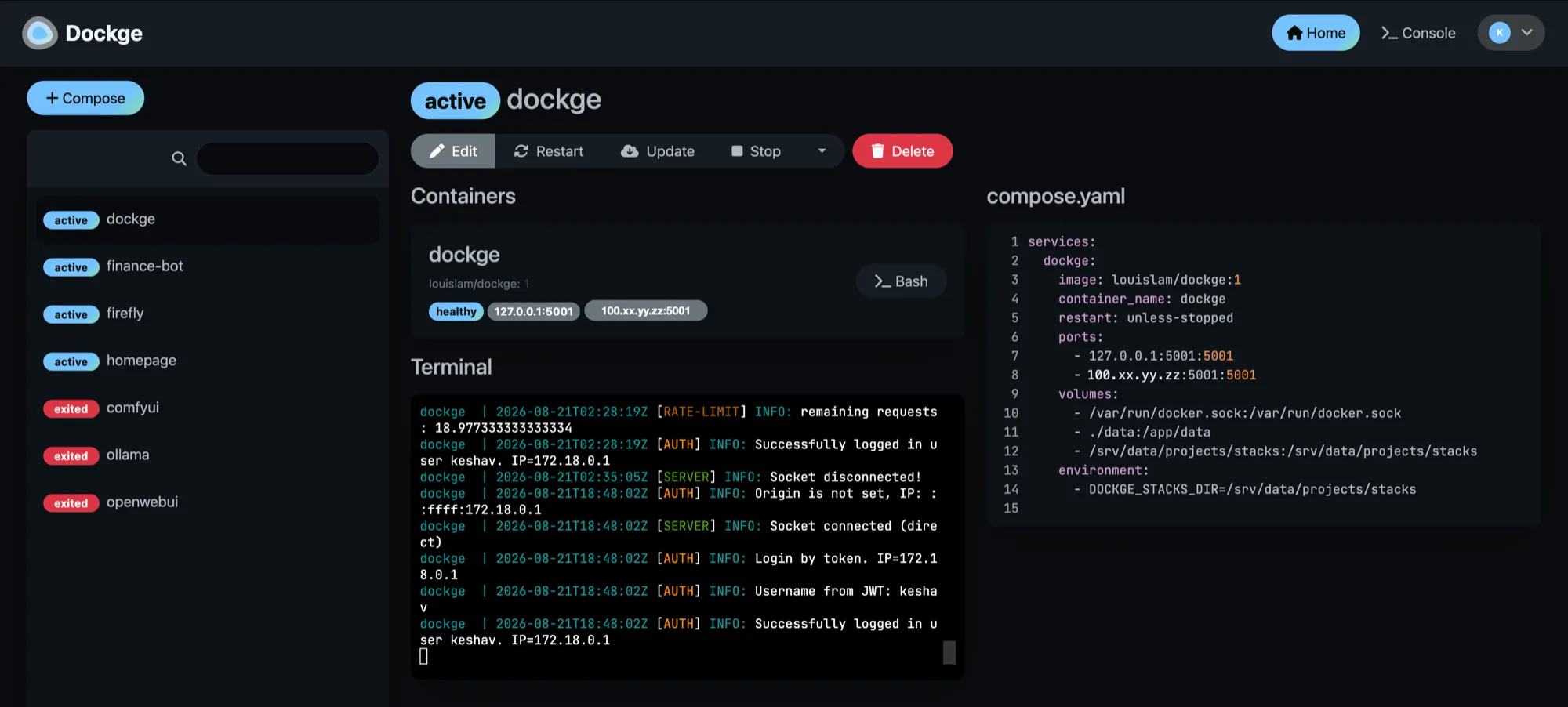
I have an idea over breakfast. I open a web UI on my phone, paste a Compose file into it, and hit deploy. Ninety seconds later the thing is running on a real HTTPS URL with a valid certificate, reachable from anywhere in the world, and I finish my coffee.
No AWS account. No instance to size. No VPC, no security group, no load balancer, no certificate to provision, no meter running. beast is a machine I built and put in the corner of my apartment, and it has quietly replaced every reason I used to have for renting someone else’s computer.
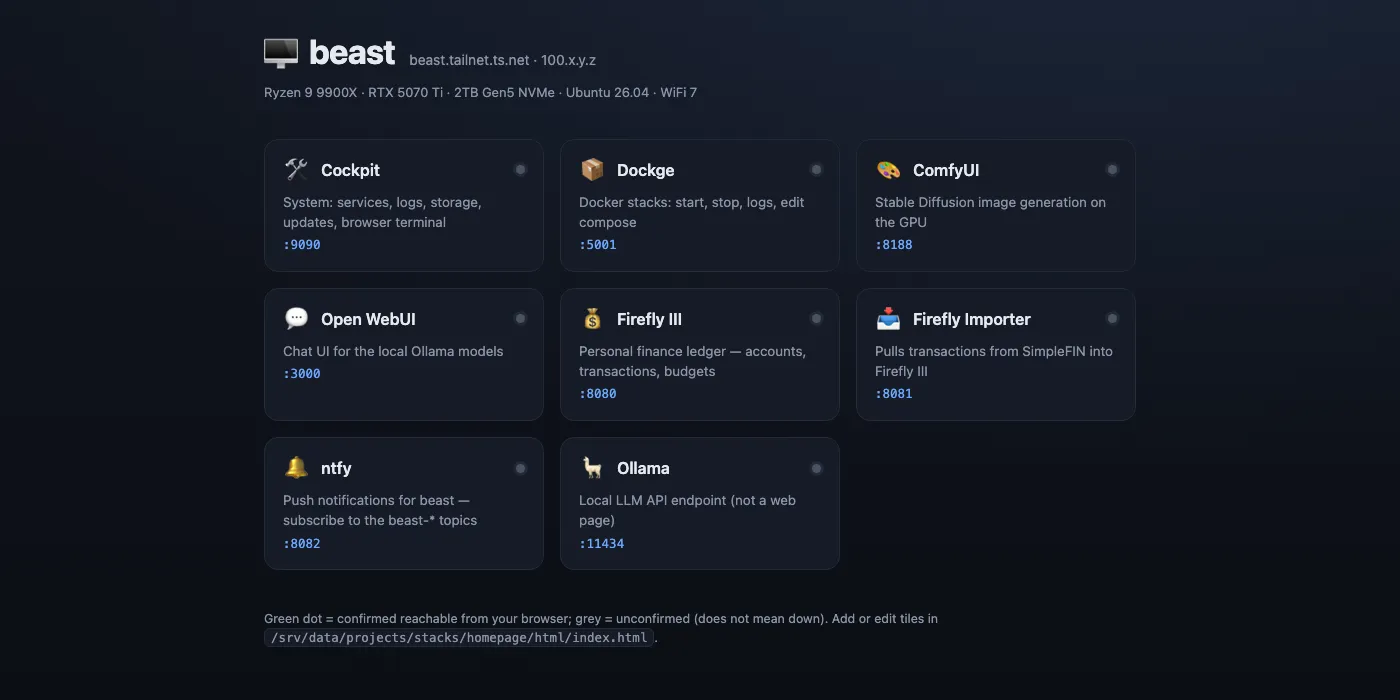
- Runs AI locally. Open-source models served on my own GPU, with an OpenAI-shaped API and a chat UI in front of them.
- Generates images and video. A full ComfyUI install with a working image-to-video pipeline on 16 GB of VRAM.
- Hosts coding agents. Agent sessions live on the box, so I can start one on my laptop and pick it up on my phone.
- Runs my money. A self-hosted Firefly III ledger and the automation around it.
- Stores everything. 1.7 TB mounted in Finder like any other drive.
- Deploys in minutes. Paste a config, hit a button, get a URL.
The Loop
The reason this changed how I build things is that the distance between “I want to try this” and “it is running on a URL” collapsed to almost nothing.
- Write a Compose file. Or paste one from a project’s README.
- Drop it into the stack manager. From a browser, on whatever device is in my hand.
- Deploy. Images pull, the container starts, and it’s live on loopback.
- One line to publish it. The reverse proxy gives it an HTTPS port on my private mesh.
- Use it. From my laptop, my phone, or a script, anywhere, on a real certificate.
The same thing on a cloud provider is an account, an IAM policy, a VPC, a subnet, a security group, a load balancer, a certificate request, a DNS record, and a bill that starts the moment you click create and never stops. Here it is a file and a button, and the marginal cost of trying something is zero, so I try more things.
That last part matters more than it sounds. When spinning something up is free and instant, a bad idea costs an afternoon instead of a monthly line item, so I stop pre-judging which ideas are worth the setup. Most of what runs on this machine now started as something I was only half serious about.
It Runs AI, And AI Runs It
This is the part that justified the GPU.
Any open-source model, on demand. I pull a model and it’s serving on an API within minutes of deciding I want it. No approval, no quota, no per-token billing, no waiting for a provider to offer it. If a promising model drops, I can be testing it against my own workload from my phone before I’ve read the whole paper. It exposes an OpenAI-compatible API, so anything I write against it works unchanged, and there’s a chat UI in front for when I just want to talk to it.
Nothing I type into it leaves the building.
Image and video generation. ComfyUI with the custom nodes and model weights that make a real image-to-video pipeline work inside 16 GB of VRAM. Generation runs for hours if it wants to; there’s no clock running.
Chaining models together, for free. Because both an LLM and an image model live on the same box, connecting them costs nothing. I wrote a small CLI called imagine that takes a one-line idea, has the local LLM expand it into a full prompt, runs the result through a validator, and queues the batch on ComfyUI. Two models cooperating in a pipeline I own end to end, with no API key and no per-call cost, so I could iterate on it until it worked instead of watching a bill grow while I debugged.
That is the shape of most things I build here now: a local model does the fuzzy part, ordinary code does the strict part, and the whole loop runs on hardware I already paid for.
And it does the boring work too. The finance system on this box uses a model to categorise the handful of transactions its rules don’t recognise each night, validated against the real category list so it can’t invent anything, and everything it writes is reversible. It runs at 05:15 whether or not I’m awake.
Agents I Drive From My Phone
The machine hosts my coding agents, which is why the phone workflow stopped being a novelty and became how I actually work.
Claude Code runs as a service on the box. A user systemd unit keeps a claude remote-control server alive, with lingering enabled so it survives reboots and doesn’t need me logged in. The Claude iOS app connects to it, so I can start a session on my laptop, close the lid, and continue the same session from my phone. The relay goes through Anthropic rather than my mesh, so it works from anywhere with signal, including places my VPN wouldn’t help.
That means “update my portfolio” is a sentence I say to my phone. The agent has the repo checked out on the box, makes the change, and pushes it. I never open a laptop.
SSH from anywhere, with no key to manage. Mesh SSH means any iOS client, Termius or whatever else, reaches the box as me. Everything long-running lives in tmux, so a cellular dropout costs nothing and tmux new-session -A makes “reconnect” and “start fresh” the same command. Admin from a train is the same experience as admin from my desk.
- The stack manager. Deploy and edit containers from a browser on any device.
- Agent sessions. Hosted on the box, resumable from the phone app, working against real repos.
- A plain SSH client. Persistent
tmuxsessions, so nothing dies when the connection does.
What Runs On It
Seven Compose stacks, tracked in git and managed from a web UI.
- Ollama. Local model serving on the GPU. It evicts the model from VRAM after five idle minutes so the card is free for everything else.
- Open WebUI. The chat front end for it.
- ComfyUI. Image and video generation, with the whole install on a bind mount so the container stays disposable.
- Firefly III + Postgres. The finance ledger. The database publishes no ports at all.
- finance-bot. The automation around the ledger, with a write-up of its own.
- Cockpit + Dockge. System admin and stack management.
- homepage. A static landing page, so the bare hostname is a dashboard of everything above.
Provisioning is a set of idempotent shell scripts that each verify their own prerequisites, so re-running any of them is safe. The Docker script refuses to start if the data volume isn’t mounted or the driver isn’t working, which means a half-finished install fails loudly at the right step rather than producing something subtly broken three steps later.
Every Service Is An HTTPS URL
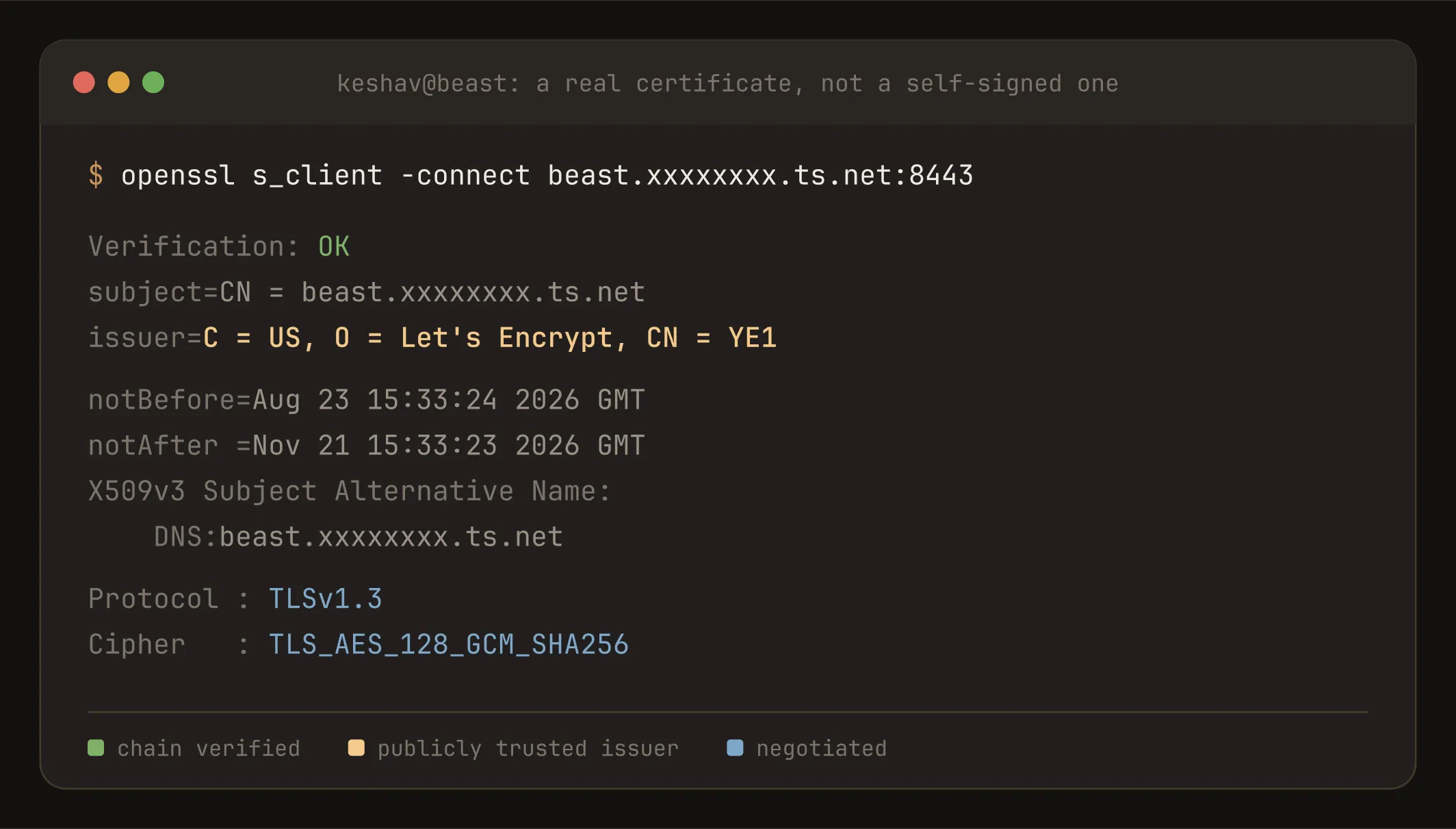
A single reverse proxy holds the machine’s address on my private mesh and terminates TLS on a genuine, publicly trusted certificate that renews itself. Every container behind it publishes to loopback and nothing else.
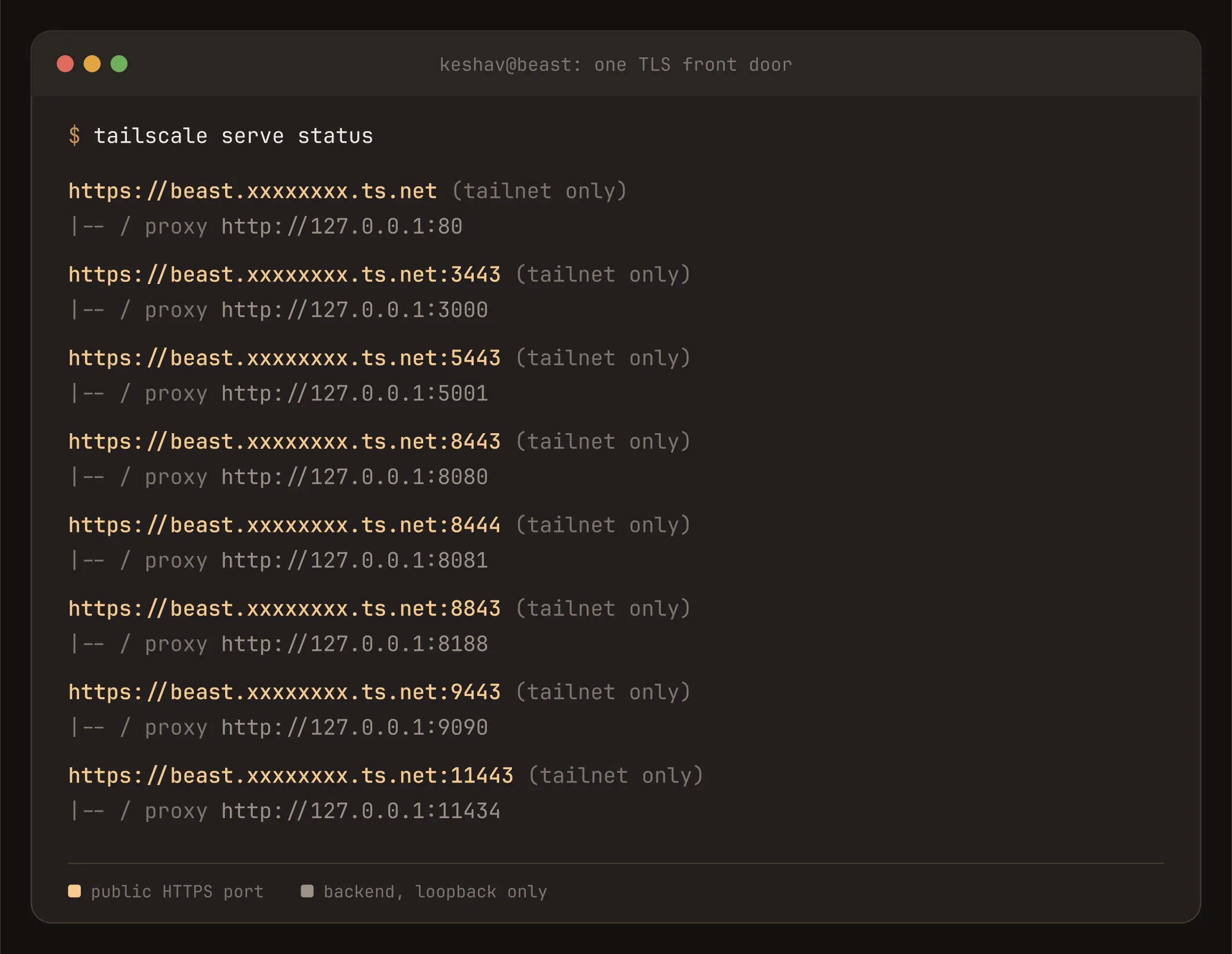
| Service | URL | What it is |
|---|---|---|
| homepage | :443 | A landing page of every link below |
| Open WebUI | :3443 | Chat UI for the local models |
| Dockge | :5443 | Compose stack management |
| Firefly III | :8443 | The finance ledger |
| Importer | :8444 | Bank transaction importer |
| ComfyUI | :8843 | Image and video generation |
| Cockpit | :9443 | Full system admin |
| Ollama | :11443 | The model API itself |
Because the certificate is real, native apps work, not just browser tabs. I run Abacus, an open-source iOS client for Firefly III, pointed at my own ledger, with balances and charts as a proper app on my home screen. Mobile apps are far stricter about this than browsers: a browser lets you click past a self-signed certificate, an iOS app’s networking stack simply refuses.
Storage That Can’t Wedge The OS
The Ubuntu installer leaves most of the volume group unallocated. A setup script carves that free space into a separate 1.7 TB data volume rather than growing root, so a runaway download or a 14 GB model file can never fill the OS disk. Docker’s images live there too, and those alone total over 80 GB.
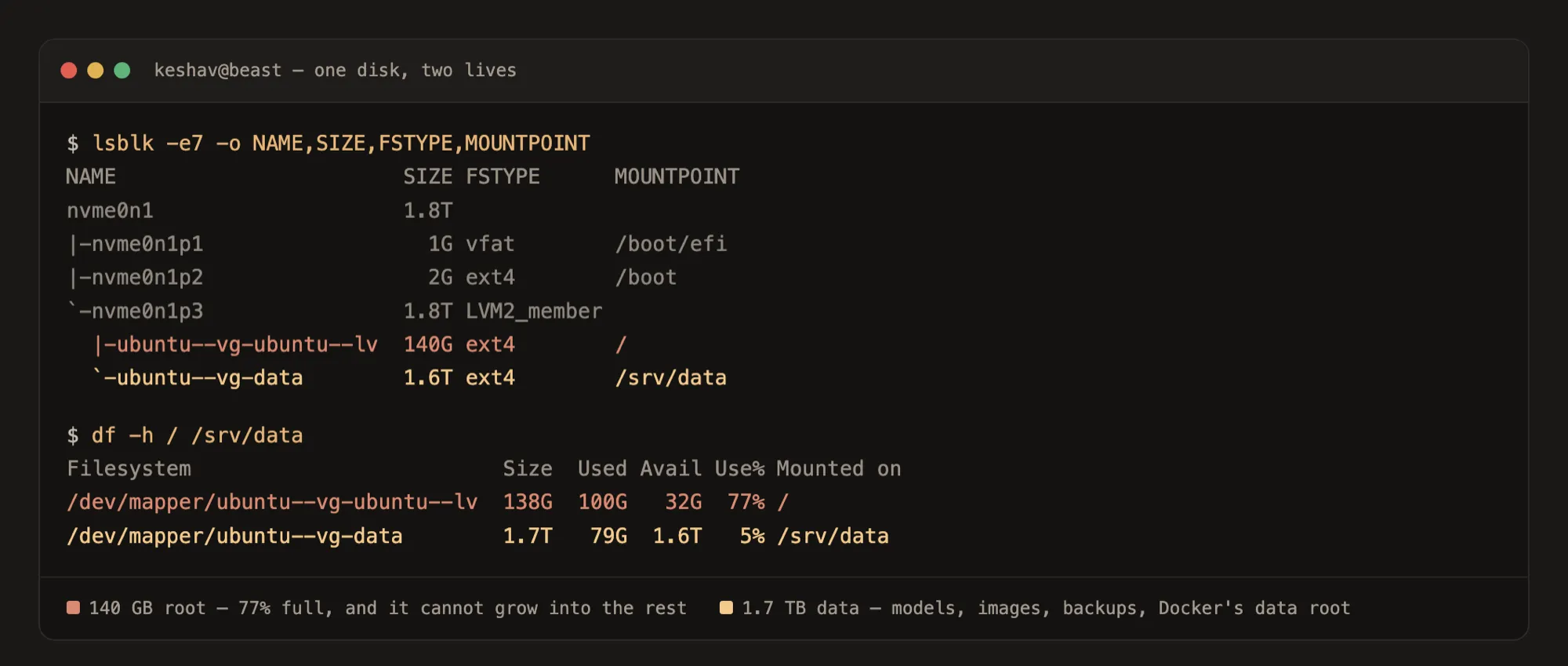
The whole volume is one Samba share tuned for Finder, which quietly removes a shell from several workflows: drop a model file in from my Mac and the running service picks it up immediately, and the finance system’s nightly backups land somewhere I can drag off the machine.
Private By Construction
Nothing is port-forwarded. There’s no dynamic DNS and no exposed SSH. Every dashboard, the shell and the file share are reachable only over a WireGuard mesh where each device is individually authenticated. Even on my own home network, the firewall denies the dashboards.
The non-obvious part, and the thing most home-lab writeups get wrong, is that Docker publishes ports below the host firewall. Docker writes published ports into an iptables chain evaluated before ufw’s rules, so a container published as "8080:8080" is reachable from every machine on the LAN and ufw deny 8080 does nothing about it. The firewall reports the rule. The port is open.
The first version of this machine handled that by binding every container explicitly, never the wildcard:
ports:
  # v1: Docker bypasses ufw, so bind explicitly, never 0.0.0.0
  - "127.0.0.1:8080:8080"
  - "100.xx.yy.zz:8080:8080"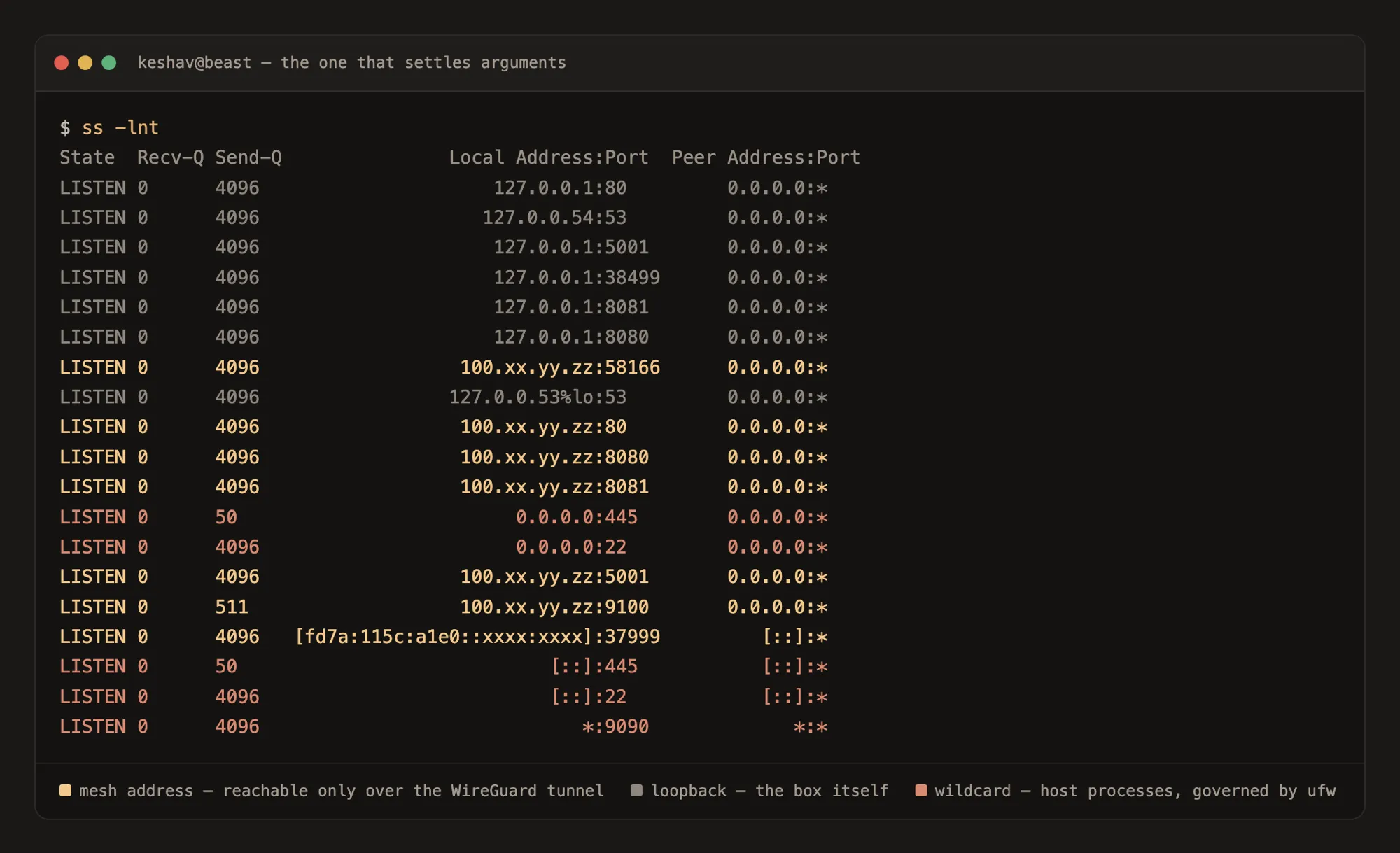
The TLS rewrite made it simpler still. Now the proxy is the only process holding the mesh address and every container is loopback-only, so the number of things listening on a reachable address dropped from “every container” to one:
ports:
  # v2: loopback only. The mesh address belongs to the TLS proxy, not Docker.
  - "127.0.0.1:8080:8080"
Host processes like sshd and Samba are a different category and really are governed by ufw. Knowing which of the two you’re dealing with is the difference between a firewall rule that works and one that only looks like it does.
It Stays Mine
There’s no monthly bill, no account that can be suspended, no model deprecated out from under me, no rate limit, and no terms of service governing what I’m allowed to run on my own hardware. The prompts, the transactions and the files never leave the building.
When it needs to be faster, I buy a part and put it in. That’s the whole upgrade process. No instance type to migrate to, no reserved-capacity commitment, no quota request.
I’m honest that it isn’t zero-dependency: the mesh has a coordination service, the certificates come from a public CA, and a few integrations talk to APIs I don’t run. But every one of those is commodity and replaceable, none of them holds my data, and none of them can raise a price on me. The tradeoff is that I’m my own operations team, and I’d make that trade again.
The box ships with a written operating guide aimed at whoever runs it rather than whoever built it, plus an instruction file at its root encoding the rules, so both humans and agents working on it inherit the constraints instead of rediscovering them.